
My homelab setup: Proxmox VE
In 2025/26 I built a new server to replace the old heap of shite I was running before. Having been asked about my configuration and general attitude to homelab stuff, I figured it was about time to write another blog post, or two…
The first of which is this: how I install and configure Proxmox. There will be more posts about the hardware, specific VMs and services, identity management, etc. soon(TM).
Disclaimer: this is not intended to be a tutorial, but I hope it may be useful—or at least vaguely interesting—to someone.
Configuring Proxmox VE
Installation
I have a single 1 TB NVMe boot disk for Proxmox - a WD SN750 which I happened to have spare.
The boot drive contains little important data as
- PVE can always be recreated
- VM disks are regularly backed up externally
- VMs themselves store little data locally, instead writing back to shares from TrueNAS
This, along with somewhat better reliability from a lack of spinning rust, is why I am content with no redundancy for disk failure.
I still use ZFS for the boot disk, simply for some of the convenience it provides with snapshots. Additionally, I set copies=2 for some extra bitrot correction. It would be rare for bitrot to occur, and a scrub should always catch it regardless. However, only with multiple disks (expensive, overkill, and I am running out of PCIe lanes), or copies can ZFS correct errors automatically.
One downside of ZFS is the unstable nature of swap space (swapvols are unstable 1, and swapfiles are not supported). ZFS also provides no way to shrink partitions, though you can grow partitions just fine, so I would suggest being more conservative with the hdsize option.
I am aware of the existence of BTRFS, which would fix almost all the gripes I have with ZFS. In fact, I am using BTRFS on the machine I am writing this from. However, I decided against it due to being significantly less well tested or supported by Proxmox, though I’m sure for a simple single-node homelab setup like this it would likely be just fine. Perhaps not for enterprise. Also bear in mind RAID 5 & 6 profiles are still unstable in BTRFS, for anyone planning on using multiple disks.
In the installer I select: ZFS raid0, copies=2, and adjust hdsize to leave space for a swap partition.
Finally, give it a static IP for now. DHCP can be configured later (with some caveats). Then reboot.
DHCP
Also see the guide from free-pmx.org 2.
Note that as of installing PVE 9.1 I did not need to manually install isc-dhcp-client.
apt install -y libnss-myhostname
sed -i.bak '2d' /etc/hosts
cp /etc/gai.conf{,.bak}
cp /etc/network/interfaces{,.bak}
Configuring IPv4 precedence:
diff /etc/gai.conf{.bak,}
54c54
< #precedence ::ffff:0:0/96  100
---
> precedence ::ffff:0:0/96  100
And configure interfaces:
diff /etc/network/interfaces{.bak,}
7,9c7
< iface vmbr0 inet static
<       address 192.168.0.182/24
<       gateway 192.168.0.1
---
> iface vmbr0 inet dhcp
One could also delete the default created bridge and use the ethernet device directly, if only using an SDN 3 vnet for all guests, but I will leave it for now.
PVE post install script
The post-install script 4 provides easy common configuration for homelab and non-enterprise users. It can be ran with:
bash -c "$(curl -fsSL https://raw.githubusercontent.com/community-scripts/ProxmoxVE/main/tools/pve/post-pve-install.sh)"
Here is the options I like to use:
disable pve-enterprise, ceph enterprise
add pve no subscription
do not add disabled pvetest
disable subscription nag yes
disable HA (high availability) yes
disable corosync yes
Swap
Now I configure swap space. I like to configure a lot of swap, as my server is almost permanently out of memory and I cannot afford more RAM right now (wtaf are DRAM prices?).
First, zram (compressed swap space in memory):
apt install zram-tools
cp /etc/default/zramswap{,.bak}
nano /etc/default/zramswap
# PERCENT=20
Then create a new swap partition using cgdisk or your favourite partition management tool:
cgdisk /dev/nvme1n1
mkswap /dev/nvme1n1p1
swapon /dev/nvme1n1p1
# Get uuid
blkid /dev/nvme1n1p1
# Make it permanent
nano /etc/fstab
# UUID=aabbccdd       none    swap    sw      0       0
And adjust swappiness 5 as desired:
root@pve:~# cat /etc/sysctl.d/99-swappiness.conf
vm.swappiness = 15
Software-Defined Networking
SDN 3 is a powerful feature of Proxmox which allows you to create virtual zones and networks, and configure firewall rules across the entire cluster. Of course, many of these features are less useful for a single-node setup, and everything I do here should still be possible with traditional tools and utils on a single node, but I prefer this way.
Masquerading (NAT) with nftables
Having guests on a bridge network, such that a single NIC has multiple MAC addresses associated with it isn’t always supported everywhere, nor is it “best practice”. We can instead use a source-NAT (SNAT) configuration.
Most of my configuration is derived from this wiki article 6.
First, install dnsmasq, which is currently the only DHCP server supported by Proxmox SDN:
apt update
apt install dnsmasq
# disable default instance
systemctl disable --now dnsmasq
Then under Datacenter -> SDN -> Zones, add a simple zone with some name. I choose dhcpsnat. Other options can be left untouched.
Under Datacenter -> SDN -> VNets, add a vnet and assign it to the zone. Select the newly created vnet and, in the right panel, create a subnet. Note that the DNS Zone Prefix option does nothing unless PowerDNS is configured, which is likely beyond the scope of most users. Also add a DHCP range.
Apply the config in Datacenter -> SDN now, so the firewall menu shows autocompletions for hosts.
Firewall
In Datacenter -> Firewall we define rules to allow DNS and DHCP traffic. One slight amendment to the wiki 6, we can use the destination +vnet0-gateway for the destination of the DNS rule. This means the rule will automatically update if the gateway IP from the vnet config is changed.
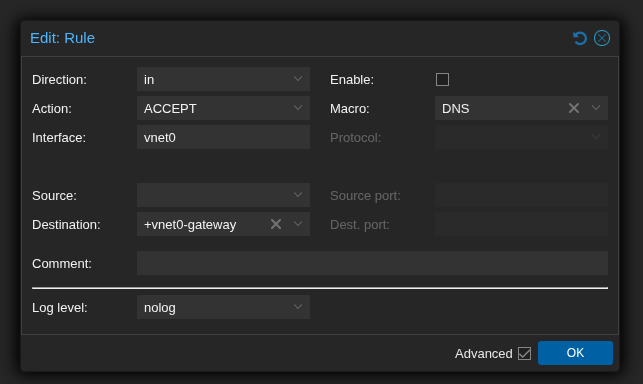
There is also one more caveat to all of this. The SDN config will probably break (I have not tested this) if the node itself does not have a static DHCP lease. This is due to the iptables commands in /etc/network/interfaces.d/sdn having a hard-coded to-source IP.
Finally, two more things we want to do: first, set Host -> Firewall -> Options -> nftables to use the new proxmox-firewall 7, and finally set Datacenter -> Firewall -> Options -> Firewall.
Port Forwarding
Currently I use the following nftables configuration, though I do not like the destination IP address being hard-coded here. This works for now, but I would be interested to hear if anyone has a better solution.
root@pve:~# cat /etc/nftables.conf
#!/usr/sbin/nft -f

flush ruleset

table ip nat {
	chain prerouting {
		type nat hook prerouting priority dstnat; policy accept;
		iifname "vmbr0" udp dport 51820 dnat to 10.10.10.51:51820
		iifname "vmbr0" tcp dport 80 dnat to 10.10.10.52:80
		iifname "vmbr0" tcp dport 443 dnat to 10.10.10.52:443
		iifname "vmbr0" tcp dport 636 dnat to 10.10.10.52:636
	}

	chain postrouting {
		type nat hook postrouting priority srcnat; policy accept;
		oifname "vnet0" masquerade
	}
}
Finally we enable forwarding:
root@pve:~# cat /etc/sysctl.d/99-ipforward.conf
net.ipv4.ip_forward=1
And enable & start nftables.
systemctl enable --now nftables.service
dnsmasq
A small improvement we can make to the DHCP server for the zone:
root@pve:~# cat /etc/dnsmasq.d/dhcpsnat/20-domain-override.conf
domain=cube.thomasaldrian.net
Where dhcpsnat is the name of the zone we created earlier. This allows guests on the SNAT network to resolve other guests by e.g. truenas.cube.thomasaldrian.net.
See this forum post 8 for more info.
Logging in with OIDC
I use Kanidm 9 to provide SSO via OpenID Connect (OIDC) for almost all my services. For convenience, I also integrate it with Proxmox.
I will not describe how to set up and configure Kanidm here, though there may be a blog post about that coming soon(TM). For now, here 10 is a ChatGPT-ed :( guide. On the PVE side:
In Datacenter -> Permissions -> Realms, add a new OpenID Connect Server:
Issuer URL: https://idm.example.net/oauth2/openid/<client id>
Realm: kanidm (used only by Proxmox)
Client ID: <client id>
Client Key: <basic secret>
Scopes: openid email profile (not using groups, as I have a custom claim instead)
Autocreate Users: yes
Username Claim: username
Autocreate Groups: yes
Groups Claim: proxmox_role
Overwrite Groups: yes (preference)
Default: yes
Comment: Login with CubeIDM (shown to user on login screen)
And in Datacenter -> Permissions, add group permissions:
Path /
Group admins-kanidm
Role Administrator

Path /
Group users-kanidm
Role PVEAuditor
Guest VMs and containers
I am deliberately leaving out a lot here for future posts. However, I will mention Home Assistant because of some specific pain points with it.
Home Assistant
Home Assistant OS (HAOS) does not provide an installer for x64 targets, only a disk image. This must be imported using qm importdisk and cannot currently be done via the Proxmox web UI.
cd /tmp/
wget https://github.com/home-assistant/operating-system/releases/download/16.0/haos_ova-16.0.qcow2.xz
unxz haos_ova-16.0.qcow2.xz
qm importdisk 410 /tmp/haos_ova-16.0.qcow2 local-zfs
Comments